Was in the code review phase last week... time for checkstyle, findbugs n PMD to come out!
Since it was a new project, with a little tinkering of a half-working Hudson ant script someone was working on, I could generate my Review reports. My checkstyle task was like below:
<target name = "checkstyle">
<mkdir dir="${checkstyle.report}"/>
<taskdef resource="checkstyletask.properties" classpath ="${checkstyle.home}/checkstyle-all-4.4.jar;${checkstyle.home}/checkstyle-optional-4.4.jar" />
<checkstyle config="${basedir}\..\settings\CheckstyleSettings.xml" failonviolation="false">
<fileset dir="${src.java.dir}" includes="**/*.java"/>
<formatter type="xml" toFile="${checkstyle.report}\checkstyle_errors.xml"/>
</checkstyle>
<style in="${checkstyle.report}\checkstyle_errors.xml" out="${checkstyle.report}\checkstyle_report.html"
style="${basedir}\..\settings\checkstyle.xsl"/>
</target>
Unfortunately, the Checkstyle Reports kept giving a strange Error in some classes:
"Got an exception - java.lang.RuntimeException: Unable to get class information for @throws tag 'DUSException'." at Line 0.
Classes which had this error would have no other Errors although the Warnings were not affected.
However, in my Eclipse editor with Checksyle Plugin and the same Checkstyle settings, I would get normal Checkstyle Errors and Warnings without thie Error.
Clearly, this was some Checkstyle runtime error and not an error in my class which resulted in Checkstyle failing to process that class for Errors.
Searched the net and came up with lots of explanations / bug accusations that made a lot of sense but no easy solution... Checkstyle was somehow missing out the DUSException class when it was encountered in a throws tag of a methods Javadoc.
So i decided to manually add my source class files to the classpath... and it worked!
<checkstyle config="${basedir}\..\settings\CheckstyleSettings.xml" failonviolation="false">
<classpath>
<path location="${classes.dir}" />
<path refid="code-lib-classpath" />
</classpath>
<fileset dir="${src.java.dir}" includes="**/*.java"/>
<formatter type="xml" toFile="${checkstyle.report}\checkstyle_errors.xml"/>
</checkstyle>
Unfortunately, the Checkstyle report started showing the real CS Errors and they doubled! :) But the team could finally tackle 'em bugs before they slipped to the next phase...
Strange thing was that most of the (new) team was also getting the same Checkstyle Bug in Eclipse... which was what made me assume that it really was a CS Bug.
Until I had a look at their CS preferences and found that they were applying CS on .java files only. Once it was changed to apply to all files, the issue was resolved in their Eclipse as well
Monday, April 27, 2009


Thursday, February 26, 2009
Uploading apps onto GoogleAppEngine behind a proxy
Was stuck for a while trying to upload my google app from the latest Google App Engine 1.1.9 - what should have been an instant upload turned out to be an all-day adventure because of the complication of behind a proxy that required user/password authentication...
But finally got it to work with the following steps (from a Win XP machine using Python v2.6.1)!
1) Install the Python patch 1424152 from http://bugs.python.org/issue1424152. They only have diff files there - so for those who don't know how to apply diff patches, I have attached the 2 PATCHED files (urllib2.py & httplib.py) for Python 2.6.1. Just replace your corresponding files in your Python26\Lib folder with these (WARNING - these files were patched specifically for Python 2.6.1. For any other Python version, you have to patch your appropriate file from the patch link above).
2) Download the latest ntlmaps proxy (v0.9.9?) from http://ntlmaps.sourceforge.net/
(its only 71kb!).
Change the following attributes in server.cfg: PARENT_PROXY, NT_DOMAIN, USER, PASSWORD.
You can leave the password empty and it will prompt you when you start ntlmaps.
3) Set the following environment values:
set HTTP_PROXY=localhost:5865
set HTTPS_PROXY=localhost:5865
(5685 is the default port used by ntlsmaps which can be changed in server.cfg)
4) Start up the ntlsmaps proxy by running runserver.bat (you might have to edit the
bat file to point to your actual python executable).
5) Test whether ntlsmaps is working by changing your browser proxy to point to
localhost:5865, and try to access some sites. If this fails, your proxy is probably
not understood by ntlsmaps or vice versa - try to finetune ntlsmaps some more.
6) Finally run your upload command:
appcfg.py update xyz/
Hopefully you should get something like this:
...\appcfg.py:40: DeprecationWarning: the sha
module is deprecated; use the hashlib module instead
DIR_PATH,
Scanning files on local disk.
Initiating update.
Email: xyz@gmail.com
Password for xyz@gmail.com:
Cloning 2 static files.
Cloning 5 application files.
Deploying new version.
Checking if new version is ready to serve.
Will check again in 1 seconds.
Checking if new version is ready to serve.
Closing update: new version is ready to start serving.
Uploading index definitions.
But finally got it to work with the following steps (from a Win XP machine using Python v2.6.1)!
1) Install the Python patch 1424152 from http://bugs.python.org/issue1424152. They only have diff files there - so for those who don't know how to apply diff patches, I have attached the 2 PATCHED files (urllib2.py & httplib.py) for Python 2.6.1. Just replace your corresponding files in your Python26\Lib folder with these (WARNING - these files were patched specifically for Python 2.6.1. For any other Python version, you have to patch your appropriate file from the patch link above).
2) Download the latest ntlmaps proxy (v0.9.9?) from http://ntlmaps.sourceforge.net/
(its only 71kb!).
Change the following attributes in server.cfg: PARENT_PROXY, NT_DOMAIN, USER, PASSWORD.
You can leave the password empty and it will prompt you when you start ntlmaps.
3) Set the following environment values:
set HTTP_PROXY=localhost:5865
set HTTPS_PROXY=localhost:5865
(5685 is the default port used by ntlsmaps which can be changed in server.cfg)
4) Start up the ntlsmaps proxy by running runserver.bat (you might have to edit the
bat file to point to your actual python executable).
5) Test whether ntlsmaps is working by changing your browser proxy to point to
localhost:5865, and try to access some sites. If this fails, your proxy is probably
not understood by ntlsmaps or vice versa - try to finetune ntlsmaps some more.
6) Finally run your upload command:
appcfg.py update xyz/
Hopefully you should get something like this:
...\appcfg.py:40: DeprecationWarning: the sha
module is deprecated; use the hashlib module instead
DIR_PATH,
Scanning files on local disk.
Initiating update.
Email: xyz@gmail.com
Password for xyz@gmail.com:
Cloning 2 static files.
Cloning 5 application files.
Deploying new version.
Checking if new version is ready to serve.
Will check again in 1 seconds.
Checking if new version is ready to serve.
Closing update: new version is ready to start serving.
Uploading index definitions.
Tuesday, February 24, 2009
Error reading from file ... .msi Verify that the file exists and that you can access it
Got a confounding error that occurred when trying to install an msi file on windows XP:
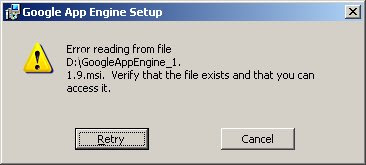 (Error reading from file ... .msi
Verify that the file exists and that you can access it.)
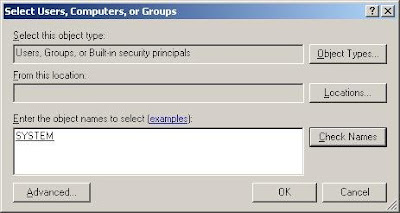
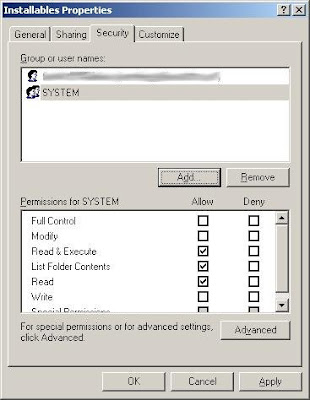
After quite a bit of hair-pulling, I realised this was happening because I had removed Security rights to all users except myself for this folder... including the System group!
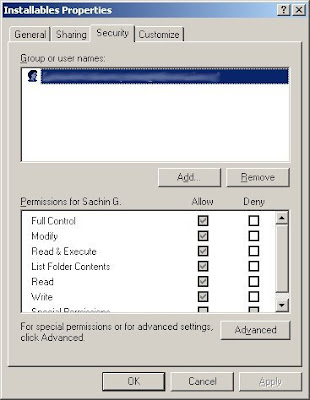
I suppose since the System is what performs actions on msi to unpack it, etc, it needs rights here.
So all I had to do was to put the msi file in a folder that has System rights.
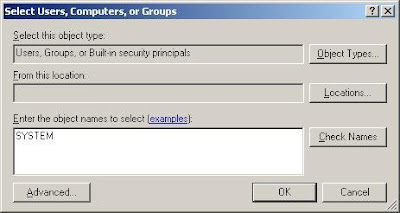
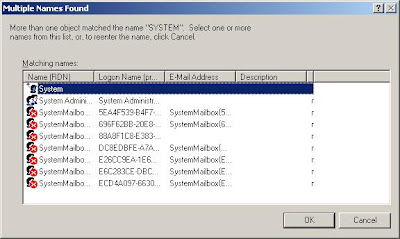
In this case, I simply enabled access for System group to the directory and the problem was solved.
 (Error reading from file ... .msi
Verify that the file exists and that you can access it.)
After quite a bit of hair-pulling, I realised this was happening because I had removed Security rights to all users except myself for this folder... including the System group!

I suppose since the System is what performs actions on msi to unpack it, etc, it needs rights here.
So all I had to do was to put the msi file in a folder that has System rights.
In this case, I simply enabled access for System group to the directory and the problem was solved.


Subscribe to:
Posts (Atom)

 Posts


